

Promoted
Jev AI Model
freemiumJev AI Model pairs a free playground with an API for turning text or JSON state into typed classifications, scores, and yes/no probability outputs.
AIDeveloper ToolAnalytics

What it does, who it helps, and how it fits into your workflow.
Teethparty is a browser-based social art experience built around the idea of a “cavity checkup for the things you never said.” Its splash image says “Teethparty,” while the live app page title is “nobodyswatching.” The central activity is answering a prompt and presenting the response as a tooth card that other visitors can discover.
The app has two spaces: a tooth case for opening cards and a 3D Teeth World where visitors can click planets to move between areas. Its interface also includes a generated Toothfairy identity, an outfit closet and social invitations. English and Korean interface text is present in the current client.
This is a public-sharing experience, not a private journal. The app explicitly says answers are anonymous and shown publicly, and asks people not to include real names. It does not provide detailed public documentation about retention or moderation on the pages reviewed, so users should keep sensitive information out of submissions.
The app presents a question, a text field and a “pull it out” action. Its current prompt asks what someone would do first with $1,000. The interface says responses are anonymous and displayed publicly, and warns against including real names. The featured prompt may change over time.
Keywords: anonymous answers, interactive prompts, public sharing, tooth cards.
Standout: responses use a tooth-card metaphor and are intended to be explored by other visitors.
The app offers a separate Teeth World view. Its interface tells visitors to click a planet to fly there; planets provide a visual way to navigate the experience. The page showed an empty-world message during this review, so the amount of content available can depend on community participation.
Keywords: 3D world, planet navigation, community answers, interactive art.
Standout: browsing is presented as moving through a small themed world rather than scrolling a conventional feed.
The onboarding flow offers a Toothfairy number for a new visitor or a sign-in option for returning users. The interface says a password can let someone return from another device with chats and answers. Account copy also includes English and Korean language choices and a setting for whether other people may send a “hey.” Keep the number and password if you choose to set them; account recovery details were not documented on the public landing page.
Keywords: Toothfairy number, password login, English, Korean.
Standout: the product uses a playful numbered identity instead of presenting a conventional public profile name in its onboarding copy.
The Teeth Closet lets a visitor adjust the tooth character's appearance with choices for items such as body, head and face. Basic options are marked free in the live interface. Some body cosmetics carry a dollar price label; the current interface data lists silver and gold Teethronaut bodies at $2 each and provides a checkout flow. The public landing page does not explain currency or checkout terms.
Keywords: avatar styling, digital closet, free cosmetics, optional paid items.
Standout: personalization is part of the tooth-character metaphor, with paid options kept separate from the public prompt and browsing concept.
Visitors can share the app link, send a short “hey,” or send another Toothfairy a tooth with a brief note. The interface says an accepted tooth invitation opens a chat in Teeth World. Account settings include a control for letting people send a “hey,” and the app has a separate chats panel.
Keywords: social discovery, tooth invitations, short messages, chat.
Standout: the app turns a profile introduction into a symbolic tooth invitation, with conversation opening only after acceptance.
The public landing page does not show a full price list or describe a subscription. The live interface includes free closet choices and optional paid cosmetics. Its currently served data marks silver and gold Teethronaut body styles at $2 each; the interface formats item prices with a dollar sign and can open an optional Lemon Squeezy checkout. We did not open checkout or complete a purchase, so the currency, taxes and payment terms remain unverified. The public prompt and browsing page loaded without a payment step during review.
Strengths
Limitations
Choose Teethparty when you want a prompt-led public sharing experience with a playful tooth-and-planet presentation. Choose a private journaling app when the writing should remain private; Teethparty explicitly says its answers are shown publicly. No direct equivalent was established from official sources during this review.
No. The interface says answers are anonymous and shown publicly. Avoid names and sensitive details; the public pages reviewed did not explain the full privacy or moderation model.
Open Teeth World and click a planet. The app can show an empty-world message when no teeth are available in that view.
The app offers a Toothfairy number and a returning-user login flow. The interface says a password lets users return from another device with their chats and answers. The public landing page does not document every feature's account requirement.
Some options are marked free, while the currently served interface lists a few cosmetic body styles at $2. No purchase is required to view the public landing page, and checkout terms were not verified.
Jev AI Model pairs a free playground with an API for turning text or JSON state into typed classifications, scores, and yes/no probability outputs.
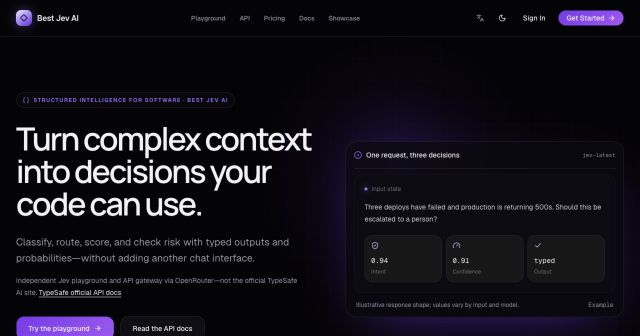
Best Jev AI pairs a free playground with an OpenRouter gateway for turning text or JSON context into typed choices, scores, and yes/no probabilities.
Browse Rush Ounza’s public software-engineering portfolio, including machine-learning notebooks, web projects, activities, and background.