


Promoted
Jev AI Model
freemiumJev AI Model pairs a free playground with an API for turning text or JSON state into typed classifications, scores, and yes/no probability outputs.
AIDeveloper ToolAnalytics

What it does, who it helps, and how it fits into your workflow.
ZombieCouple is a browser-based photo-to-video studio for making a short, fictional zombie reunion. It places two people—or a person and a pet—into a preset story: one character has changed, the other recognizes them, they embrace, and the scene moves into a warm memory. The website describes pale zombie makeup and a gentle, nonviolent story rather than a horror effect built around gore.
The studio accepts two portraits or one shared photo containing both faces. In the two-photo setup, Photo 1 is the survivor and Photo 2 becomes the zombie; for a shared image, the person on the right turns. Users can also assign a person or a pet to the zombie role. The generated scene is fictional and uses AI to create its setting, movement and transformation from the reference images.
This is a constrained story generator, not a live camera filter or a general timeline editor. The preset supplies the action and soundtrack direction, while the user selects the available effect and render settings. The site says checkout and rendering are currently unavailable, so its listed credit prices should be treated as published pricing information rather than a presently purchasable offer.
Choose separate portraits for the survivor and the character who turns, or upload one photo with both faces visible. The role instructions explain which person is used for each part of the story; a Swap photos control is described for changing roles. Clear, unfiltered faces give the model stronger references, but the site warns that generated faces and actions can vary.
Zombie Story follows the trend sequence of an encounter, recognition, a hug and a warm-memory scene. A second Zombie effect focuses on gradual transformation and an embrace. The scene and motion are generated from the selected preset; the workflow does not promise exact shot timing or a specific likeness.
Before rendering, the studio displays model, resolution, duration, aspect ratio and credit cost. The home page shows a standard 720p, 12-second vertical video as the default example. Its pricing table lists Seedance 2.0 Mini, Seedance 2.0 Fast, Seedance 2.0 and Seedance 2.5 options, with different credit requirements by resolution. Actual availability depends on the configured generation service.
The site advertises HD video without a watermark and describes downloading the result for posting. It recommends adding a separately licensed song in a social app if a user wants a particular track. The service does not insert a user's own memory footage into the generated flashback; combining personal footage requires a separate editor.
ZombieCouple is a paid, credit-based service according to its published pricing page; it does not list free video generation. The site describes one-time credit packs whose credits do not expire and monthly subscriptions whose credits refresh each month. A standard 720p, 12-second video is listed as 10 credits, while higher resolutions, different models and longer durations cost more. The studio's quote should be checked before any render because available settings can change the amount.
| Published option | Credits | Listed price |
|---|---|---|
| Single pack | 10 | $3.99 one time |
| Duo Pack | 50 | $29 one time |
| Crew Pack | 350 | $99 one time |
| Studio Pack | 900 | $199 one time |
| Label Pack | 3,000 | $499 one time |
| Basic plan | 100 per month | $29.90/month |
| Pro plan | 300 per month | $49.90/month |
| Studio plan | 800 per month | $99.90/month |
The page says pack credits never expire and plan credits refresh monthly. It also lists failed renders as returning credits. However, the same page explicitly says checkout is not available yet, and the home page says checkout and rendering are available only when those services are enabled. These prices were checked on 2026-10-15 and could not be purchased or tested in this review.
Strengths
Limitations
Choose ZombieCouple when a guided zombie reunion story, clear role assignment and a short photo-based result fit the goal. Its preset reduces prompt writing and scene setup, but it leaves less control over individual shots. If you need to insert personal footage, set exact cuts or shape a custom sequence, use a conventional video editor after generating or sourcing the clips; ZombieCouple says its template creates the memory scene rather than inserting a user's own footage. This review does not rank a specific competing product because the reviewed materials do not establish a like-for-like comparison.
The website lists paid credit packs and subscriptions, and says there is no free video. It currently also says checkout is unavailable, so listed prices do not mean a purchase can be completed now.
The studio describes both options: two separate portraits or one shared image containing both faces. Check the role assignment before submitting; in the shared-photo setup, the person on the right becomes the zombie.
No exact likeness is guaranteed. The terms say AI may change faces or miss an expected action, and the FAQ advises reviewing the result before posting. No generation was available to test during this review.
The privacy policy says photos and generation instructions are used to make the requested video and may be sent to the configured AI provider. Stored media may remain until removed through a support request; the policy does not promise an automatic deletion deadline. Avoid uploading confidential or intimate material and get consent from everyone pictured.
Jev AI Model pairs a free playground with an API for turning text or JSON state into typed classifications, scores, and yes/no probability outputs.
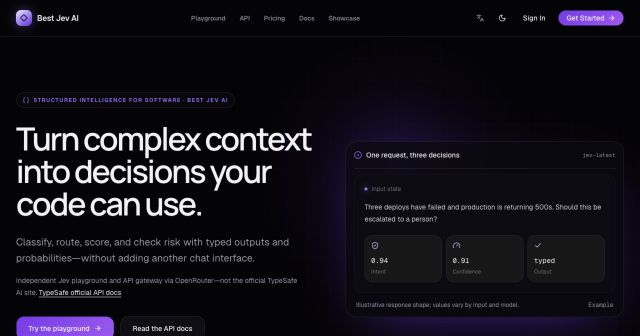
Best Jev AI pairs a free playground with an OpenRouter gateway for turning text or JSON context into typed choices, scores, and yes/no probabilities.

Browse Rush Ounza’s public software-engineering portfolio, including machine-learning notebooks, web projects, activities, and background.